Friday, August 27, 2010

Hands-On Project 11-1 (Page 394)


Objective ad Verbatim:

“In this project, you will download different hash generators to compare hash values.” (Ciampa, 2009)

Process:

1. I pointed my browser (Firefox) to md5deep.sourceforge.net to download MD5Deep, a utility program to generate the hash from a file.


2. After the download completed, I extracted thecontents of the zip file to my desktop.


3. Next, I opened up my Word processor, typed in the sentence, “Now is the time for all good men to come to the aid of the country.” and saved the file as country1.docx.


4. I saved the sentence, “Now is the time for all good men to come to the aid of the country” (without the period), as country2.docx.


5. Tabbing to the desktop, I navigated to the MD5Deep folder.


6. Now, opening a command prompt and navigating to the MD5Deep folder, I generated the MD5 hash of the md5deep.txt file {md5deep md5deep.txt}. The program outputted the MD5 hash in the next line.


7. Next, I used MD5Deep to generate the MD5 hashes of country1.docx and country2.docx to compare the differences between the two document files with slightly different contents { md5deep country1.docx country2.docx}.


8. Continuing on my bid to explore and compare the strengths and weaknesses of different hashing algorithms, I used SHA1 to generate hashes of country1.docx and country2.docx {sha1deep country1.docx country2.docx}.

 
9. Next, I used SHA256 to hash the two document files {sha256 country1.docx country2.docx}. [9_sha256]
10. Finally, I tested out the Whirlpool algorithm. It generated a considerably longer hash than the other algorithms tested {whirlpooldeep country1.docx country2.docx}.


Reflection:

It is necessary to clarify that the underlying premise of hashing is to maintain integrity. Now, hashing algorithms might not contain the same mathematical formulae or work the same way but there is one crucial attribute shared by all the hashing algorithms: the function used to generate the hash is _one-way_.

i.e. There is no way to derive the original plaintext from the checksum.

However, hashing algorithms are not foolproof. Collisions, as an example, are a prevalent risk. This is especial when pertaining to hashing algorithms which generate hashes in a weak way or generate hashes that are too short. The shorter the length of the hash, the more collisions it might incur. This is the basic principle behind a birthday attack. The more prone to collisions a hashing algorithm is, the higher the probability of a random collision.

From the exercise done, we can see that (simply by observing the length of the hash) MD5 is the most prone to collisions while Whirlpool is the least prone. This may translate to increased security in terms of probability theory.

Sine Cera,
Jeremy Heng.

"Quis custodiet ipsos custodes?"

Hands-On Project 11.1 Sources

Hands-On Project 8-5 (Page 297)


Objective ad Verbatim:

“In this project, you use the OpenID account that you created in the previous project.” (Ciampa, 2009)

Process:

1. Now on to testing the OpenID. I pointed Firefox to LiveJournal’s page to login with an OpenID URL. To login (this being the first time), I simply input my PIP OpenID URL into the field provided and clicked ‘Login’.


2. On the first login with the OpenID, Verisign redirects you to a page to set when LiveJournal expires as a trusted site. On this page, you are presented with a few options pertaining to time or logic as to when the trusted site expires.


3. After setting the required options, Verisign directs you back to LiveJournal logged in to your account and authenticated.


4. Next, I pointed my browser to LifeWiki’s login page. After entering the OpenID URL into the Identity URL field, I clicked on ‘Login via OpenID’.


5. Opere citato, I am prompted by Verisign to set the trusted site expiry.


6. And as before, I am logged into the website.


Reflection:

What I personally glean from this exercise is the simplicity and elegance to using a single OpenID to manage web applications that provides potential value to the user (in terms of social networking and the broadcasting of information in this case).

However, using an OpenID runs the risk of the usual issues with Password Management Programs simply for the reason that it consolidates many accounts into one where only one instance of authentication is used (typically). Breaking the OpenID account password would grant access to a whole host of applications to a malicious user. A few possible methods to obtain OpenID access could include theft of cookies, malware or password cracking.

Sine Cera,
Jeremy Heng.

"Quis custodiet ipsos custodes?"

Hands-On Project 8.5 Sources

Hands-On Project 8-4 (Page 296)


Objective ad Verbatim:

“OpenID is a decentralized open source FIM that does not require specific software to be installed on the desktop. OpenID is a uniform resource locator (URL)-based identity system. In this project, you create and use an OpenID account.”

Process:

1. First, I pointed my browser to Verisign’s registration page (pip.verisignlabs.com) to sign up for an OpenID account. After entering in all the required information, I clicked ‘Create Account’.


2. The submit brought me to a confirmation page of the creation of my account giving me a multitude of options and my PIP URL.


3. From the page, ‘My Account’ allows you to personalize and update your personal details as well as add an avatar.


4. Now, to test out that the account is valid, I signed out and logged into the PIP.


5. If I clicked on ‘My Information’, it takes me to a summary of my profile where I can see and edit the information contained in the account.


Reflection:

This practical demonstrates how easy it is to obtain an OpenID to use with sites that support it.

Sine Cera,
Jeremy Heng.

"Quis custodiet ipsos custodes?"

Hands-On Project 8.4 Sources

Hands-On Project 8-1 (Page 294)


Objective ad Verbatim:

“Cognitive biometrics holds great promise for adding two-factor authentication without placing a tremendous burden on the user. In this project, you participate in a demonstration of Passfaces.” (Ciampa, 2009)

Process:

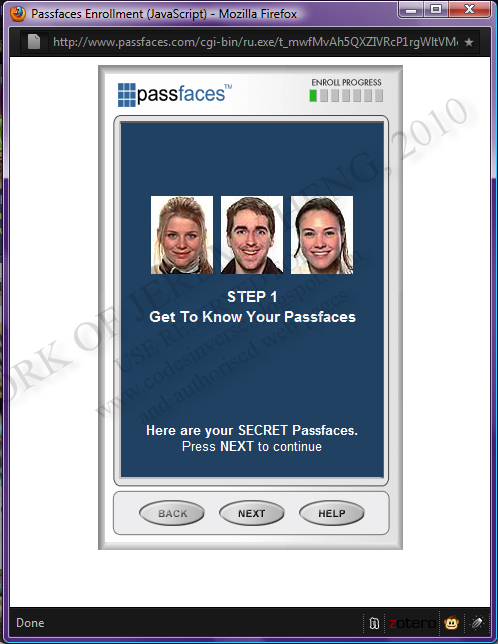
1. Firstly, I pointed my web browser (Firefox!) to passfaces.com/demo to access the online Passfaces demo.


2. The web application displays some instructions to enrolling an account in the Passfaces demo.


3. Passfaces then presented three faces to use as ‘Secret Passfaces’ that the user would recognize to enter an account.


4. It puts forth the faces individually so as to accustom the user to their Passfaces.


5. When all the faces are shown, an array of faces of different ethnicity and structure containing one of the user’s Passfaces.


6. It continues on until the user is used to the practice login.


7. This brings us to the end of the demo.


Reflection:

This hands-on practical demonstrates the advantages and disadvantages of using cognitive biometrics to accompany or replace the traditional password/passphrase method of authentication. The premise for Passfaces employs the innate human ability to recognize faces and, in its essence, to detect the subtle differences in facial structure via a sensitive cognitive function.

From a radical point of view, this method of authentication would serve sufficiently for most people capable of sight. However, it does include drawbacks such as when a person suffering from face blindness or Prosopagnosia has to use Passfaces. The inability to recognize faces would render the whole facial recognition paradigm moot.

From a security risk point of view, if one were to attempt to crack the password simply via the method of brute force paired with luck (due to the limited number of pictures of faces) could break into a users account. Also, a variety of methods could be used to monitor the user’s choices when logging in, especially when the number of faces to remember has to be kept low such that the user can easily remember, to compromise the intactness of the account. With these concerns, a facial recognition system would probably work best paired with other forms of authentication in a multi-factor authentication system.

Sine Cera,
Jeremy Heng.

"Quis custodiet ipsos custodes?"

Hands-On Project 8.1 Sources

Hands-On Project 7-2 (Page 258)


Objective ad Verbatim:

“The drawback to using strong passwords is that they can be very difficult to remember, particularly when a unique password is used for each account that a user has. As an option there are several passwords storage programs that allow the user to enter account information such as username and password. These programs are themselves then protected by a single strong password. One example of such a password storage program is KeePass Password Safe, which is an open source product. In this project, you will download and install KeePass.” (Ciampa, 2009)

Process:

1. First, I downloaded the Classic Edition of the Portable KeePass 1.17 off the KeePass.info website.


2. I extracted the downloaded zip onto my desktop into a folder named ‘KeePass’.


3. Since WinRAR extracted to a folder on the desktop, I navigated to the folder and opened the KeePass program.


4. I created a new password database and was prompted to enter the Composite Master Key.


5. Next, I added a New Entry. Namely, the login information to HackThisSite.org.


6. I double clicked on the URL field to visit the HackThisSite login page.


7. Now, bringing up the KeePass window, I dragged and dropped the username and password information into the the according fields on the HackThisSite login page.


8. After clicking submit, the login worked ending the demonstration on how to use KeePass to log into a website.
 

Reflection:

I personally believe that password management programs are a double-edged sword with its advantages and disadvantages in terms of convenience and security.

When password management programs are used as a tool to consolidate a multitude of passwords for various websites and applications in a bid to separate passwords should an account be compromised it displays its ability to provide a singularized and systematic form of managing non-congruent passwords.

However, when using a local consolidated application to store passwords to everything protected with a single password, it could pose a security risk should this database of passwords be stolen and the master password be cracked.

This ultimately brings us to the necessity of using a strong secure password.

Sine Cera,
Jeremy Heng.

"Quis custodiet ipsos custodes?"

Hands-On Project 7.2 Sources

Hands-On Project 7-1 (Page 256)


Objective ad Verbatim:

“Although brute force and dictionary attacks were once the primary tools to crack an encrypted password, today rainbow tables are more frequently used. In this project, you download and install Ophcrack, an open-source password cracker program that uses rainbow tables.” (Ciampa, 2009)

Process:

1. For starters, the Ophcrack client was downloaded along with the Windows XP Tables (Free Small). The client was installed on a VMWare Virtual Machine (Windows XP) with the tables put into an external hard drive. I then proceeded to create test accounts.


2. I named the accounts according to password strength: Easy Entry; Medium Entry; Hard Entry; Insane Entry.


3. I made the passwords as such: Easy Entry: ‘dog’, Medium Entry: ‘ronweasly’, Hard Entry: ‘sT@rW@rz5VI’, Insane Entry:’ fgsfds4CHAN*j355s^;{}’.


4. After setting up the accounts, I maneuvered to the Ophcrack program.


5. Before attempting to crack the local SAM hashes, configuration was needed. I plugged in my external hard drive and added the XP free small tables location.


6. Next, I loaded the local SAM hashes to obtain the LM and NT hashes of the passwords.


7. The Easy Entry password was cracked in under five seconds.

 
8. The Medium Entry password was cracked in under a minute.


9. The statistics tab will display what is going on during the cracking process in more detailed figures.


10. The Hard and Insane Entry were not crackable using the XP Free Small tables


11. Next, I attempted cracking the first hash provided in the practical. Copying the text into notepad, I saved the file for Cain to work on.


12. I opened Cain, a software capable of cracking LM/NTLM hashes via various methods.


13. Next, I imported the NT hash in the text file I made previously.


14. I decided to use a brute force attack to crack the NTLM hash.


15. I loaded the hash.


16. I proceeded to start the cracking process. It broke the hash in less than a second.


Reflection:

Foremost, this practical highlights the need to use and maintain secure passwords. On Windows machines, it is possible to obtain the local SAM password easily with pwdump or a program with integrated LM/NT password hash accessing capabilities such as Ophcrack. In UNIX or UNIX-like systems such as Linux, the hashes (which may be stored in MD5) are found in /etc/passwd or /etc/shadow.

Now, I’ll cover rainbow tables in more detail in a separate post. However, I’ll put forth some discourse on the importance of choosing passwords programmatically and manually improbable to crack. Firstly, we identify the factors which pose substantial difficulty to breaking hashed passwords.

Length is one factor. Since, some brute force programs try every possible combination of plain text to hash, the variability or length of the password would mean that there would be a huge pool of possible permutations. Furthermore, in a brute force or dictionary attack (more particularly hybrids with the ability to mutate dictionary words) length plays a huge part when systematically determining if the plain text matches the hashed value (in a pool of (number of possible characters)^(number of fields)).

Another is password complexity. Since the number of possible permutations depend on the number of possible characters exponentiated by the number of fields, an increased character set will be harder to break than a set with fewer characters. For example, a character set containing only lower case alphabets would be easier to break than a character set containing upper and lower case alphanumeric values.

Another factor regarding the breaking of hashes is memory space. When generating lists of every possible plain text to hash, the memory space available is typically not sufficient to contain an extensive list. This coupled with the processing power required to generate that amount would pose a difficulty hard to overcome. (This was solved via the Rainbow Tables method)

Sine Cera,
Jeremy Heng.

"Quis custodiet ipsos custode?"

Hands-On Project 7.1 Sources